



Bypass Android screen Pattern Lock
$120.00
Description
Regain access to your locked Android device quickly and responsibly with the Android Pattern Lock Bypass Mastery Guide – a comprehensive, up-to-date digital toolkit packed with legitimate, step-by-step methods to remove or bypass a forgotten screen pattern lock in 2026. Whether you’ve forgotten your pattern after a long break from your phone, set a complex one by mistake, or are helping a family member recover their device, this guide focuses exclusively on authorized, owner-only recovery techniques that align with Google, Samsung, and Android manufacturer protocols.
No shady hacks, exploits, or illegal tools here – just clear, practical instructions based on official features, cloud services, and verified third-party software (where safe and legal). In an era of strengthened Android security (Android 15+ with enhanced encryption, FRP, and biometric integration), bypassing locks without proper credentials is intentionally difficult to protect user privacy. This guide helps you navigate those barriers ethically while explaining when data loss is unavoidable and how to minimize it.
Core Legitimate Methods Covered (Updated for 2026 Android Versions):
- Google Find My Device (Find Hub) – Primary No-Data-Loss Option (When Possible) Use Google’s official remote tool to locate, lock, or reset your device. If the phone is online and linked to your Google account, you can often set a temporary password or erase the lock (with potential data preservation via backups). Step-by-step setup for enabling beforehand and recovery process included.
- Samsung Find My Mobile – Brand-Specific Unlock (Samsung Devices Only) For Galaxy users: Log into findmymobile.samsung.com with your Samsung account to remotely unlock the pattern without wiping data (if the feature was pre-enabled). Covers Galaxy S, A, Z series, and more – one of the few methods that frequently avoids factory reset.
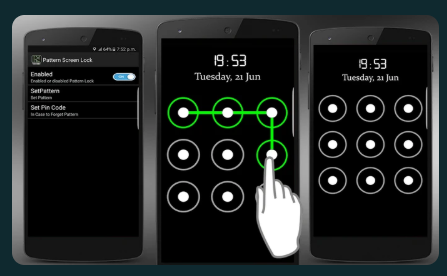
- Forgot Pattern / Backup PIN Recovery (Legacy Android 4.4 & Some Variants) This guide provides a detailed walkthrough for older devices, where repeatedly entering incorrect patterns triggers the “Forgot Pattern” prompt. To reset, simply sign in with your Google credentials. Includes troubleshooting for when this option no longer appears in modern versions.
- Smart Lock & Trusted Devices (Prevent Future Lockouts) Proactive setup: Use location, Bluetooth devices, voice, or on-body detection to keep the phone unlocked in safe scenarios. Learn to configure now so you never face this issue again.
- Factory Reset via Recovery Mode (Last Resort – Data Loss Expected) Hard reset through power + volume button combinations (device-specific guides for Pixel, Samsung, Xiaomi, etc.). Post-reset: Restore from Google backup to recover apps, photos, and settings. Emphasizes data backup importance beforehand.
- Professional Unlock Software Options (Safe & Compliant Tools) Reviews of reputable 2026 tools like PassFab Android Unlocker, Tenorshare 4uKey, Dr.Fone, or iMobie DroidKit – focused on screen lock removal (pattern/PIN/password) with no data loss on supported older Samsung/LG models. Explains FRP bypass integration, compatibility (Android 6–16), and why these are preferable to random YouTube “hacks.”
- ADB (Android Debug Bridge) Advanced Method (If USB Debugging Was Enabled) For tech-savvy users: Connect to PC, use ADB commands to remove gesture.key file (pattern storage) without full wipe – only if debugging was pre-activated.
Why This Guide Is Essential in 2026:
- Security & Legality Focus – All methods are for devices you own or have legal permission to access. Unauthorized bypassing (e.g., on someone else’s phone) violates privacy laws, anti-hacking statutes, and can lead to criminal charges. The guide includes clear ethical/legal warnings.
- Data Preservation Priority – Step-by-step risk assessment: Which methods keep photos/contacts intact? How to back up via Google Drive before risky steps.
- Modern Android Challenges Addressed – FRP (Factory Reset Protection), encrypted storage, removed legacy “Forgot Pattern” in newer OS versions, and why brute-force or emergency call exploits no longer work reliably.
- Preventive Tips & Best Practices – Set up biometrics (fingerprint/face), backup PINs, multiple Google accounts, regular cloud backups, and password managers to avoid lockouts forever.
- Visual Aids & Troubleshooting – Includes diagrams for button combos, screenshots of Find My Device interface, and common error fixes (e.g., “Device offline,” FRP loops).
Important Disclaimers & Responsible Use:
This guide is educational only – not a guarantee of success on every device due to manufacturer variations and security patches. Screen locks exist to protect your data; bypassing them carries risks like permanent data loss or bricking if done incorrectly. Never use these methods on stolen/lost devices – report to authorities instead. If the phone contains sensitive info (work, financial), consult the manufacturer support or a professional service. For addiction/compulsive behavior concerns related to device access, seek appropriate help.
Instant Digital Delivery – PDF guide + checklists + video links (where legal) – access immediately. Compatible for all Android users worldwide in permitted regions.
Don’t stay locked out – empower yourself with safe, legitimate knowledge. Get the Android Pattern Lock Bypass Mastery Guide today and reclaim your device the right way in 2026. Secure, ethical, and effective – your phone access restored responsibly!




Reviews
There are no reviews yet.